
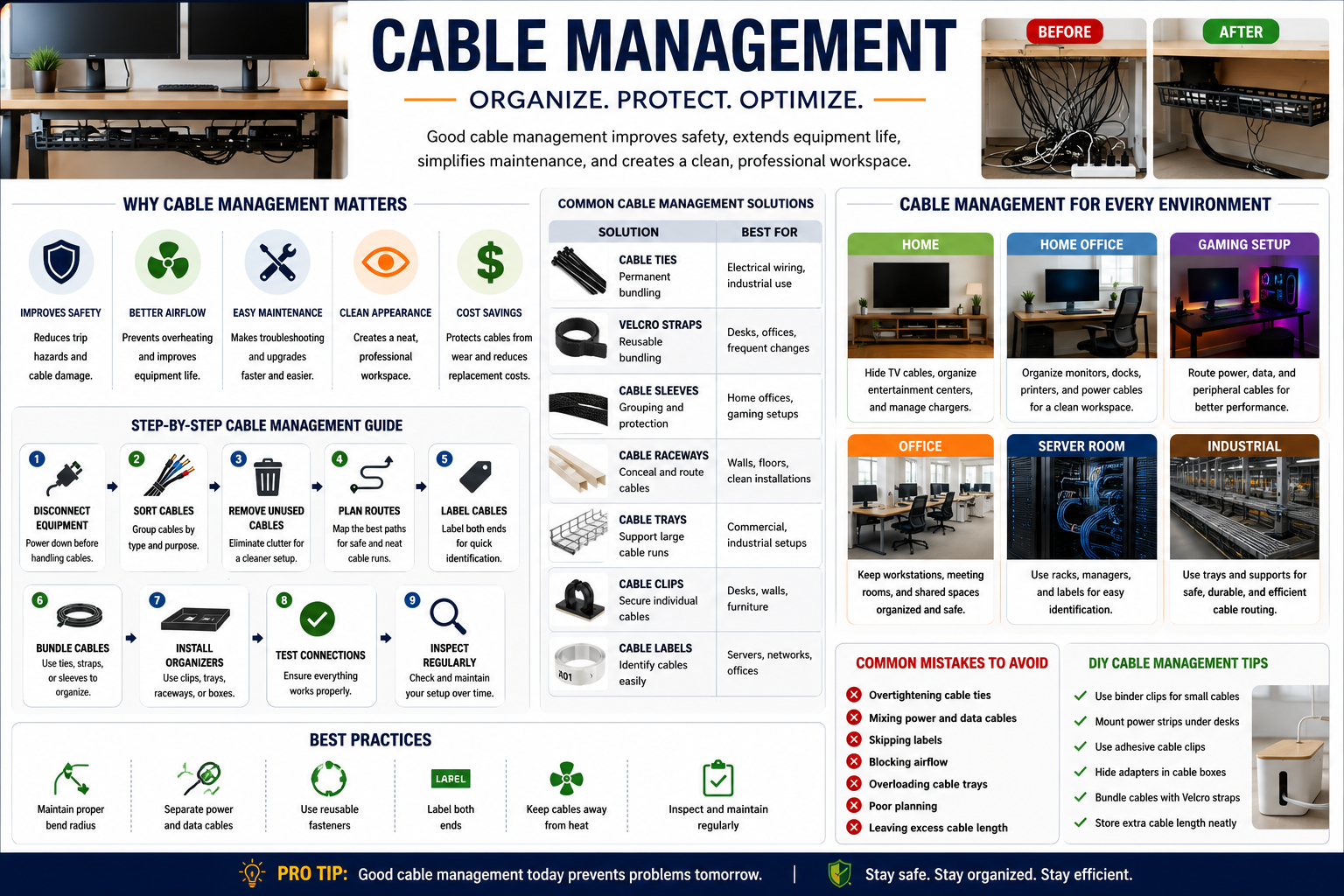
Whether you’re working from a home office, building a gaming setup, managing a server room, or organizing industrial wiring, effective cable management is essential. Tangled cables don’t just look messy—they can become safety hazards, restrict airflow, make troubleshooting difficult, and shorten the lifespan of your equipment.
A well-planned cable management system improves organization, protects cables from damage, and creates a cleaner, more efficient environment. From simple cable ties to advanced cable trays and raceways, there are solutions for every space and budget.
In this guide, you’ll learn what cable management is, why it matters, the best cable management products, practical organization techniques, common mistakes to avoid, and expert tips for maintaining a tidy setup.
What Is Cable Management?
Cable management is the process of organizing, routing, securing, labeling, and protecting electrical, power, and data cables to improve safety, efficiency, and appearance.
Rather than leaving cables tangled or scattered across floors and desks, cable management uses tools like cable ties, sleeves, clips, trays, and raceways to keep everything organized and easy to maintain.
Good cable management benefits both residential and commercial environments by making systems easier to install, inspect, repair, and upgrade.
Why Cable Management Is Important
Many people think cable management is only about aesthetics, but it offers several practical advantages.
Improves Safety
Loose cables can create tripping hazards and increase the risk of damaged insulation or accidental unplugging. Organizing cables helps reduce these risks while creating a safer workspace.
Extends Equipment Life
When cables are bent excessively, crushed under furniture, or exposed to constant movement, they wear out faster. Proper cable management protects cables from unnecessary stress and extends their lifespan.
Enhances Airflow
Bundled cables can block ventilation around computers, servers, and networking equipment. Organized cable routing promotes better airflow, reducing overheating and improving system performance.
Simplifies Maintenance
Labeling and organizing cables allows you to identify the correct connection quickly, making repairs, upgrades, and troubleshooting much easier.
Creates a Professional Appearance
Whether at home or in the office, clean cable management makes any workspace look more organized and professional.
Benefits at a Glance
| Benefit | Why It Matters |
| Improved Safety | Reduces trip hazards and cable damage |
| Better Organization | Makes cables easy to identify |
| Easier Maintenance | Speeds up repairs and upgrades |
| Better Airflow | Prevents overheating |
| Longer Cable Life | Protects against wear and tear |
| Cleaner Appearance | Creates an organized workspace |
Common Cable Management Solutions
Choosing the right cable management product depends on the number of cables, installation location, and future maintenance needs.
Cable Ties
Cable ties are one of the simplest and most affordable cable management tools.
They work well for permanent installations but should not be tightened excessively, as this may damage cables.
Best for:
- Permanent bundles
- Electrical wiring
- Industrial installations
Velcro Straps
Velcro straps are reusable and ideal for setups that change frequently.
They are commonly used in offices, gaming setups, and networking environments because they allow cables to be added or removed without cutting the fastener.
Best for:
- Home offices
- Computer desks
- Server racks
Cable Sleeves
Cable sleeves group multiple cables into one protective cover.
They improve appearance while protecting cables from dust, abrasion, and pets.
Popular sleeve materials include:
- Braided fabric
- Neoprene
- Split tubing
- Flexible mesh
Cable Raceways
Cable raceways conceal cables inside protective channels mounted along walls, floors, or baseboards.
They’re excellent for entertainment centers, conference rooms, and offices where exposed cables would otherwise create clutter.
Cable Trays
Cable trays support large groups of cables in commercial and industrial buildings.
Unlike conduit, trays make it easier to add, remove, or inspect cables without major modifications.
Common types include:
- Ladder trays
- Wire mesh trays
- Perforated trays
- Solid-bottom trays
Cable Clips
Cable clips secure individual cables to walls, furniture, or desks.
They’re inexpensive, easy to install, and ideal for preventing charging cables from falling behind furniture.
Cable Labels
Cable labels make identifying connections fast and accurate.
Using color-coded or printed labels reduces downtime during maintenance and helps prevent accidental disconnections.
Cable Management Product Comparison
| Solution | Best For | Reusable | Difficulty |
| Cable Ties | Permanent installations | No | Easy |
| Velcro Straps | Frequently changing setups | Yes | Easy |
| Cable Sleeves | Home and office organization | Yes | Easy |
| Cable Clips | Individual cables | Yes | Easy |
| Cable Raceways | Wall-mounted cables | Yes | Moderate |
| Cable Trays | Commercial installations | Yes | Advanced |
Cable Management for Different Environments
Different spaces require different cable management strategies.
Home Cable Management
Living rooms often have televisions, gaming consoles, streaming devices, and sound systems connected with multiple cables.
A combination of cable sleeves, raceways, and cable boxes keeps these wires hidden while maintaining easy access.
For charging stations, use cable clips to prevent charging cords from falling behind furniture.
Home Office Cable Management
Remote work has increased the number of devices on modern desks.
A clean workstation can be achieved by:
- Installing an under-desk cable tray
- Bundling monitor cables
- Labeling power adapters
- Using Velcro straps
- Mounting power strips beneath the desk
These simple improvements make cleaning easier and reduce visual clutter.
Gaming Setup Cable Management
Gaming desks often include multiple monitors, RGB lighting, consoles, speakers, microphones, webcams, and charging cables.
To maintain a professional-looking setup:
- Route cables behind the desk
- Bundle similar cables together
- Separate power and data cables
- Use cable sleeves for visible wiring
Office Cable Management
Business environments require cable organization that supports collaboration while maintaining safety.
Conference rooms benefit from floor raceways, while shared desks should include cable trays and reusable fasteners for easier equipment changes.
Server Room Cable Management
Network cables should always be labeled and separated according to function.
Professional server rooms often use:
- Horizontal cable managers
- Vertical cable managers
- Patch panels
- Color-coded Ethernet cables
These practices simplify troubleshooting and reduce maintenance time.
Industrial Cable Management
Factories and warehouses use cable trays, conduit systems, and heavy-duty supports to protect power and communication cables.
Industrial cable management focuses on:
- Safety compliance
- Heat dissipation
- Equipment protection
- Easy maintenance
- Future expansion
Step-by-Step Cable Management Guide
A systematic approach produces the best results.
Step 1: Disconnect Equipment Safely
Power down equipment before handling electrical cables.
Step 2: Sort Your Cables
Separate:
- Power cables
- Data cables
- Audio cables
- Video cables
- Charging cables
Step 3: Remove Unused Cables
Old or unused cables create unnecessary clutter.
Recycle or store extras appropriately.
Step 4: Plan Cable Routes
Decide where each cable should travel while avoiding sharp bends and heat sources.
Step 5: Label Every Cable
Clear labels save time during future maintenance.
Step 6: Bundle Similar Cables
Group cables by purpose using Velcro straps or sleeves.
Step 7: Install Organizers
Use trays, clips, raceways, or cable boxes depending on your setup.
Step 8: Test Every Connection
Confirm all devices function correctly before finalizing installation.
Step 9: Perform Regular Inspections
Review your cable management every few months and replace damaged accessories when necessary.
How to Choose the Right Cable Management Products
Before purchasing accessories, consider the following factors:
- Number of cables
- Indoor or outdoor use
- Cable thickness
- Future expansion
- Installation difficulty
- Budget
- Accessibility requirements
Home users often need only cable sleeves, clips, and Velcro straps, while commercial installations may require cable trays and raceways.
Common Cable Management Mistakes
Avoid these common errors to improve both safety and organization.
Overtightening Cable Ties
Excessive pressure can damage insulation and reduce cable lifespan.
Mixing Power and Data Cables
Running these cables together may increase electrical interference.
Skipping Labels
Unlabeled cables waste valuable troubleshooting time.
Blocking Ventilation
Avoid placing large cable bundles directly in front of cooling fans.
Ignoring Future Expansion
Leave enough space to add cables without rebuilding the entire installation.
Cable Management Best Practice
Professionals follow several proven practices.
- Maintain proper cable bend radius.
- Keep power and data cables separate whenever possible.
- Use reusable fasteners for frequently changing systems.
- Label both ends of every cable.
- Inspect cable organization regularly.
- Remove damaged cables immediately.
- Document complex installations for future maintenance.
These habits improve reliability while reducing downtime.
Simple DIY Cable Management Tips
Improving cable management doesn’t always require expensive equipment.
Affordable ideas include:
- Use binder clips to organize charging cables.
- Mount a power strip beneath your desk.
- Install adhesive cable clips.
- Hide power adapters inside decorative cable boxes.
- Bundle monitor cables with reusable Velcro straps.
- Store excess cable length behind furniture.
Small improvements can dramatically improve the appearance and functionality of your workspace.
Cable Management Maintenance Checklist
Keeping cables organized requires occasional maintenance.
Monthly:
- Inspect cable bundles.
- Remove dust buildup.
- Check for damaged insulation.
Quarterly:
- Verify labels remain readable.
- Tighten loose organizers.
- Test cable supports.
Yearly:
- Replace worn accessories.
- Remove obsolete cables.
- Update cable documentation.
Routine inspections prevent minor issues from becoming expensive repairs.
Frequently Asked Questions
What is cable management?
Cable management is the practice of organizing, securing, protecting, and routing cables to improve safety, accessibility, and appearance.
Why is cable management important?
It reduces trip hazards, protects cables from damage, improves airflow, simplifies maintenance, and creates a cleaner workspace.
What is the best cable management solution for a desk?
For most desks, a combination of Velcro straps, an under-desk cable tray, cable sleeves, and adhesive cable clips provides excellent organization.
Are cable sleeves better than cable ties?
Cable sleeves are better for hiding multiple cables, while cable ties are ideal for permanently bundling cables. Many setups benefit from using both together.
How often should cable management be inspected?
Home users should inspect cables every few months, while commercial and industrial installations may require more frequent inspections depending on usage.
Can poor cable management damage electronics?
Yes. Poor routing can cause overheating, excessive cable stress, accidental unplugging, and premature cable failure.
Conclusion
Effective cable management is about much more than keeping cables neat. It improves safety, extends equipment life, simplifies maintenance, enhances airflow, and creates a more organized environment.
Whether you’re organizing a small home office, building a gaming station, managing a business network, or installing industrial wiring, choosing the right cable management tools and following proven best practices will help you create a safer, cleaner, and more efficient setup. Start with simple improvements such as labeling cables, using reusable fasteners, and installing cable trays or sleeves where needed. Small changes today can save significant time and effort in the futur